Upgrading To React 18 Isn’t That Hard. Here’s How To Do It.
The steps we took to migrate our micro frontends, Recoil state, and tests to React 18.
Migration made easy

We read a lot of people and companies having issues with the migration from a previous version of React library to the latest version, the React18, and thought it would be hard to upgrade our micro frontend applications from React16 to React18, with RecoilJS and all the tests.
It turns out that no, it was not that hard. Actually, it was pretty easy!
We did it pretty fast, without breaking anything. We migrated the whole application to the latest React, recoil, and testing library version without experiencing any issues.
In this article, we are going to analyze the actions that we made in order to get an easy migration to a newer version of the library.
What’s New in React18?
React-dom API is changing. This is the fastest answer to the question.
This article is not meant to be an in-depth journey into React18 because a lot of things were limited or deprecated before this version came out, and the other features are just little changes (such as renderToPipeableStream or useEffect or StrictMode).
Sure, we are reflecting all of these changes from our point of view, (React16 code base), where we are already using functional components for easier usage of the hooks, such as useEffects.
Migrating to React18 in a Few Easy Steps
Again, this is our personal experience. It might be different for others or in other environments.
First of all, we needed to clean all the old dependencies and check for security issues for the others via npm audits. It’s always about the node modules.
After this “pre-hook,” we verified the official React changelogs, then upgraded the React package and start to get the errors we planned to see, such as the ReactDom package that changed its API:

Even in the test env, the error looks as follows:
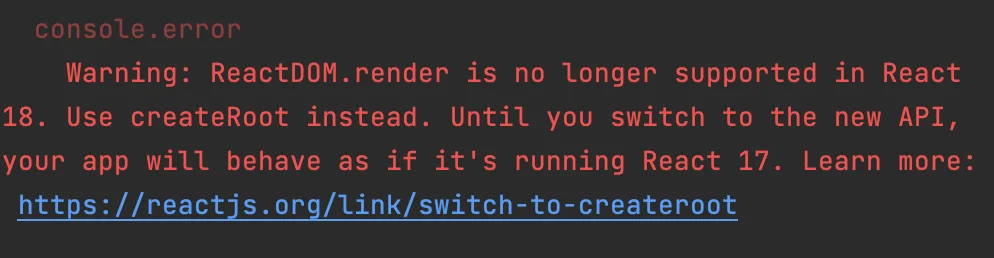
By analyzing these errors, we changed the deprecated render method and also updated the testing-library/react to still run the unit test successfully.
Since we were already using functional components, the useEffects minor changes don’t affect us, but we added the newest StrictMode to verify that (it’s available only in dev mode).
Another major change in this React version relates to the Suspense usage and its tree that is now always consistent. We were not experiencing any issues.
Lastly, we needed to upgrade RecoilJS to the latest version to support the latest React version. Otherwise, the app would crash when it gets to the first state.
And here we go, we’ve just finalized our migration.
We needed to upgrade these few things to get our migration process done for all our micro frontends applications.
This process was made easy by our foresight in bringing the latest version of the packages that we are using without any fear of the time, effort, and boring stuff that needed to be done.
Takeaways: Always Upgrade Your Dependencies and Approaches
As I said, we were migrating from a code base in React16.
How many of you are updating your dependencies any time a new major version is released?
A good way to reduce the effort and hard times during migration is to schedule an “upgrade task” during the sprint as a tiny workload to avoid a bulk upgrade that may lead to huge time wasting.
Of course, we need time to make the updates, but it’s more under control to update a few things instead of a full code base.
“Yeah, OK, but my manager/pm does not let me schedule these maintenance tasks!”
Unfortunately, I heard a lot of people experiencing this issue. Speak to your manager to let them understand the importance of being updated with the tech stack, and also include that it’s good for security reasons.
“I hate upgrading or auditing my dependencies. It’s boring and very hard to accomplish.”
This period should not exist in a good environment.
Sure, it’s not fun to audit and update dependencies, but it’s part of our job and responsibilities.
Be a better developer, and upgrade your dependencies.
See also the Growens Innovation Blog edition.
Originally published in Better Programming.